Tell Aiva™ what should happen.
Name the platform and the action you need, such as creating a lead or passing a service request into your existing system.

Connect any API-enabled platform automatically, with no coding required. Describe the action you want, and FliPath™ generates the API task configuration and data mapping. Connect your authorized account, review the action and activate it.
Connect your favorite apps automatically—no coding required. Describe what you want to happen, and Aiva™ generates the integration and maps the data for you.
 Google Sheets
 Slack
 Salesforce
 HubSpot
 Mailchimp
 Trello
 Asana
 Zendesk
 Zoom
 Discord
 Notion
 Airtable
 OpenAI
 Google Drive
 Microsoft Teams
 Typeform
 Webflow
 Pipedrive
 Intercom
 Gmail
 Dropbox
 Shopify
 Stripe
 Calendly
 Twilio
 GitHub
 Jira
 Zapier
 Google Calendar
 WordPress
 WooCommerce
 MySQL
 PostgreSQL
 Telegram
 X (Twitter)
 LinkedIn
 Facebook Pages
 SendGrid
App examples for connected workflows. Available actions follow each service’s API, account permissions and plan.
Explore potential connections to 22 platforms with documented APIs, from Jobber and Housecall Pro for service businesses to Gingr for boarding and daycare.
Find the connection route and access requirements for each platform.
HTTP Basic authentication over HTTPS with the account's numeric User ID and API key; OAuth is available for an app connecting multiple accounts. Calls must run server-side. Official help lists API access on Premium or Powerhouse plans. Calendar and appointment-type configuration must already exist. Keep normal client validation enabled: admin=true bypasses availability and attribute checks.
Official API documentation ↗The Open API requires a Buildium Premium subscription. An administrator enables Open API and creates a key with the required entity/read-write permissions. Requests use x-buildium-client-id and x-buildium-client-secret headers; the vendor recommends server-to-server calls.
Official API documentation ↗AuthX API key or JWT in an accepted bearer header, on a deployment where the administrator enabled that authentication flow. The user needs API authentication and entity/action permissions. A customer-controlled CiviCRM installation with supported APIv4 REST/AuthX configuration is required. Hosting, support or managed-service fees are separate; no universal SaaS plan entitlement is implied. Confirm the installation's entity fields and permissions in its API Explorer.
Official API documentation ↗The property must have API access and an authorized user must create credentials for the appropriate permission scopes. Self-service property keys can be sent in x-api-key or as a bearer token. A technology partner requires the documented partner authentication/certification process in addition to a property-level development key.
Official API documentation ↗Use OAuth or a user API key with HTTP Basic authentication. API access inherits the user’s permissions; agents see their assigned/collaborating contacts. A system providing services to a Follow Up Boss customer must register with Follow Up Boss; allow for assignment before immediate follow-on operations.
Official API documentation ↗Current API uses an organization-scoped X-Api-Key plus the account subdomain header and JSON:API headers. Generate approved keys in the Gingr admin dashboard. Legacy account-specific /api/v1 calls use a user-specific key and a different contract. Account/key permissions, configured services and location rules apply. Public docs do not establish a universal subscription entitlement or price; confirm these with Gingr. Do not mix current and legacy endpoints. Booking validation and any manual staff confirmation must be respected.
Official API documentation ↗Enable Hostaway API in the operator dashboard and obtain the account identifier and client secret. Use the OAuth 2.0 client-credentials grant to obtain a bearer token and reuse it until renewal is required. The current vendor key-creation guide requires selecting a partner; verify the permitted partner/account setup and rate limits.
Official API documentation ↗Public API access and Job inbox API Leads require a MAX plan. An administrator generates the API key and chooses full or read-only permissions; lead creation requires write access. Enable the API Leads channel in Job inbox and validate the Create Lead request against the current endpoint schema.
Official API documentation ↗Bearer service key with object-specific read/write scopes, created by a Super Admin or a user with Developer tools access. A developer-platform app with static or OAuth access is another route. Use scopes and CRM objects available in the customer's account. Service keys make REST requests but cannot authenticate webhooks. Existing legacy private apps remain supported; creating a new legacy private app ended October 26, 2026. Use the current service-key or developer-platform flow.
Official API documentation ↗OAuth 2.0 authorization-code grant for a distributed integration; ad-hoc scripts can use basic authentication with the documented API-token setup. Endpoint scopes and the acting user's service-desk permissions both apply. The customer needs an accessible Jira Service Management service desk with a configured request type and required fields. Raising requests for someone else, viewing restricted issues and reading SLAs require the corresponding user/agent rights. API documentation does not itself establish the customer's subscription entitlements.
Official API documentation ↗Register an application in the Jobber Developer Center and connect an actual Jobber business account. A company administrator authorizes the application using OAuth 2.0; this is not a static API-key connection. Select required scopes and manage token refresh. Use an active X-JOBBER-GRAPHQL-VERSION header. Jobber states private integrations need review when connecting to more than five paying accounts.
Official API documentation ↗Developer account, sandbox development, live approval and site-specific activation by the business owner are required. Use a production API key and the endpoint's required user/staff authentication and permissions. Live approval and owner activation are explicit prerequisites. API usage and booking fees may apply; confirm the developer agreement and account entitlements. The JavaScript API reference did not expose all current path details in the text browser, so workflows below use official endpoint names rather than guessed URLs.
Official API documentation ↗Administrator enables web services and REST, selects allowed functions in an external service and issues a user/service token with the required capabilities. Availability depends on the installed Moodle version, hosting configuration and administrator permissions. API documentation is also available inside the customer's own Moodle site; confirm its exact function schema there. Do not assume a managed hosting plan permits arbitrary external services.
Official API documentation ↗Have access to an OfficeRnD organization and create an application with client credentials. API v2 uses OAuth 2.0 and granular scopes; creating bookings requires flex.space.bookings.create. Confirm the resource, member/company and booking policy; use the documented policy-enforcement option for validated bookings.
Official API documentation ↗An administrator of an active trial or paid Onfleet account can generate an API key. API-key authentication uses HTTP Basic authentication over HTTPS. The operator needs configured workers/teams and a validated dispatch process; a task is not a guarantee that a driver accepts or completes the work.
Official API documentation ↗Assigned and enabled Developer and Customer keys with the method's API permission; the practice needs a compatible Open Dental version and a working eConnector for the remote API. Read All is listed as free with a slower throttle. Appointment writes require the Appointments permission in a paid developer tier; fees are per practice location and paid by the developer. WebSched-specific slot endpoints additionally require a WebSched subscription and setup. Verify current fees before quoting.
Official API documentation ↗A Shopmonkey account administrator creates an API key in Settings > Integration > API Keys. Use the API token as a bearer credential over HTTPS; the key inherits the creating user’s permissions. Validate the shop’s API entitlement, permissions, v3 resource fields and rate limits before rollout. No unsupported plan entitlement is assumed.
Official API documentation ↗An authorized seller access token; OAuth is the documented route for a third-party application. Request the endpoint's appointment or order scopes and map the correct location, bookable service and team member. Buyer-level appointment operations are available to all sellers, with control limited to application-created bookings. Seller-level writes need Appointments Plus or Premium and APPOINTMENTS_ALL_WRITE as well as APPOINTMENTS_WRITE. Check support_seller_level_writes first. Orders retrieval requires ORDERS_READ; payment processing and non-Square-payment order fees are separate.
Official API documentation ↗Connect the operator account to a developer company through the Stora Developer Portal. Use an access token for an internal connection or OAuth 2.0 for a third-party application; request the necessary resource permissions. Confirm the operator’s API eligibility, site access and current API version. Use idempotency keys for supported create operations.
Official API documentation ↗Authorization: token with a private branch API key, configured by an administrator with Use and configure the API permission. Treat the key as branch-wide access. An account with enabled API integration is required; the reviewed docs do not specify a universal API plan surcharge. A fixed IP rate limit and a tighter write limit apply. Datetimes use UTC; send explicit timezone offsets when filtering a local day.
Official API documentation ↗Admin-generated account-level bearer access token with a selected expiration and scopes. Candidate creation requires w_candidates; job lookup uses r_jobs. Official token help labels access available on all plans. Permissions, account subdomain, token expiration and the job's required fields still apply. Candidate intake must distinguish sourced/uploaded records from actual applications.
Official API documentation ↗OAuth 2.0 client-credentials bearer tokens with approved scopes. Vendors distributing integrations need the commercial-partner application route. Private-integration credentials cannot simply be handed to a third-party company under the published private terms. Approval and agreement are required. Private read-only implementations list a one-time setup fee; write-back adds recurring per-location fees. Those private terms are not a commercial-partner quote. Each hospital needs integration setup and approved scope; obtain a permitted arrangement before enabling a FliPath™ task.
Official API documentation ↗Name the platform and the action you need, such as creating a lead or passing a service request into your existing system.
FliPath™ generates the API task configuration and maps the collected information to the action—without writing code.
Connect your approved account, review the generated workflow and activate it. Available actions follow the connected platform’s API and permissions.

Create a lead in your CRM. Send a service request to your job-management system. Trigger a team notification. FliPath™ connects the conversation to the API action your business needs.
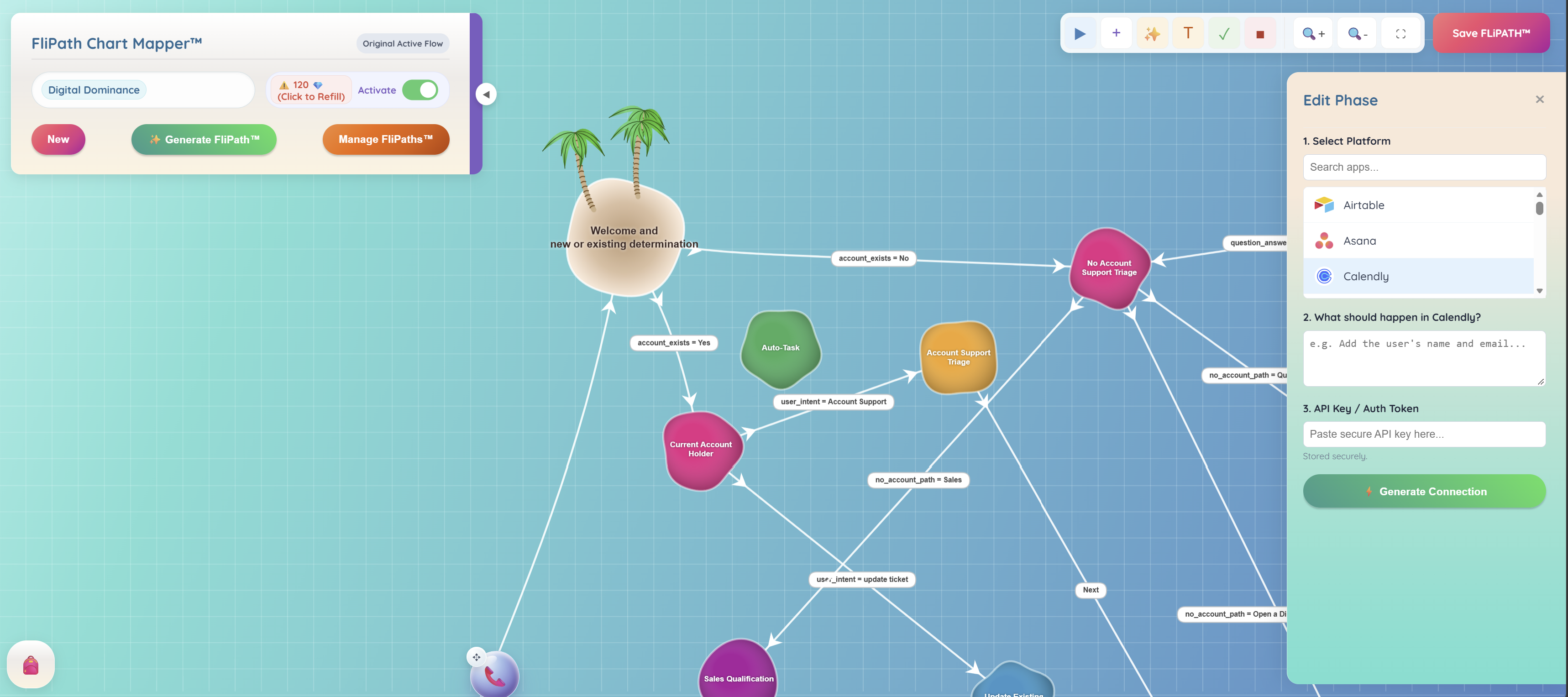
Explore a connected workflow ↗This product screen shows a Calendly task being configured from an action description and an authorized API connection.
 View full size
Select a service such as Calendly, describe the desired action and connect your authorized account to generate the API task.

A booking question can lead to your Book Now button, your scheduling page or a configured API task that passes the collected details to your scheduling tool.
Keep the customer’s name, request and preferred contact together as the conversation moves forward.
See keyword buttons and business training ↗Give them a useful first answer. Give yourself a clearer next step.