See the page and the journey.
Use page context, browsing history and activity to understand which services or offers interest the prospect.
Aiva EngaigeMate™ CommsBot™ is a complete AI contact center in a box, speaking almost any language your customer does across calls, chat and messaging. Automatic ticket creation escalates issues to your agents.

| Channel | What you can do | What gets it live |
|---|---|---|
| Website chat | Answer in the customer’s language, offer manual chat and a live-agent handoff. SiteScout Raîdar™ follows the browsing journey to provide relevant help and information; HeatScore™ highlights visitors who may be ready to buy now. | Install your widget, review business information and test routing. |
| Phone calls | AI call handling, browser answering, forwarding, outbound calls and transcripts. | An available number, paid line, voice credits and configured routing. |
| SMS | Continue customer conversations by text. | Messaging-capable number, registration where required and applicable carrier fees. |
| Business messaging connected to your agent workspace. | WhatsApp sender onboarding and approval; buying a number alone is not activation. | |
| Bring Facebook customer messages into your connected conversation workflow. | Concierge setup is available on request. Request Facebook setup ↗ | |
| Forward customer email, manage threads and convert important requests into tickets. | Business forwarding and outgoing mail settings. AI drafts are optional. | |
| Tickets | Track requests with ownership, status, priority and conversation context. | Configure WaiPoint ServiceDeck™ access and the intake fields your team needs. |
Aiva EngaigeMate™ CommsBot™ speaks almost any language your customer does. Automatic language detection helps Aiva™ answer in the customer’s language, using your business knowledge and the context of the conversation.
From the first website question to a phone inquiry, help more customers explain what they need and reach the next step.

Your knowledge.
A welcome they understand.

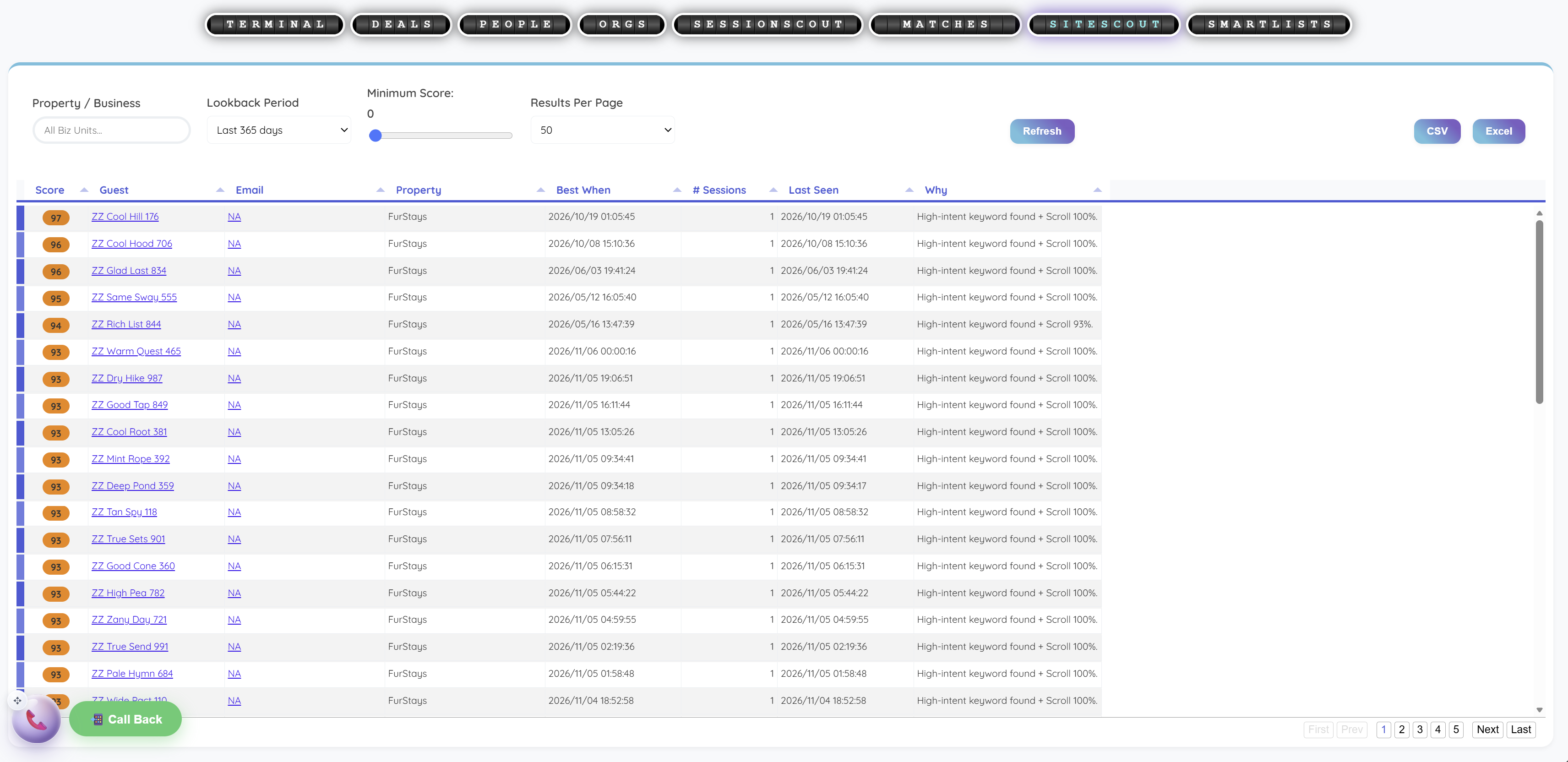
SiteScout Raîdar™ helps your sales team spot buying intent as visitors browse. See the services, products and offers that interest each visitor, then use HeatScore™ to prioritize prospects who may be ready to buy. Start a relevant sales conversation with their browsing context already in view.
Use page context, browsing history and activity to understand which services or offers interest the prospect.
HeatScore™ brings activity, keywords and scrolling together to help your sales team prioritize prospects for timely outreach.
Use configured proactive messages or a personal sales-agent reply to discuss the offer, qualify the inquiry and guide the prospect toward a purchase or booking.
HeatScore™ indicates possible interest; it helps prioritize a conversation.
 View full size
Prioritize visitors using HeatScore™ and its supporting signals, including page keywords, scrolling and recent activity.
One click turns your business information into a complete contact-center flow: AI answers, automated routing, intake, ticket creation and escalation. Review and activate it in the visual FliPath™ builder.
Three practical questions are a good place to start. Aiva™ helps turn them into a working draft; your team stays in control of the process.
Describe the app and the task. Aiva™ generates the API configuration and maps the data; add your account credentials to connect the service.
Less searching through separate conversations. More context for the person taking the next step.

Manage service requests with statuses, ownership, priorities, custom fields, replies and Notes. Connect related tickets and turn an email into tracked work.

Keep people, organizations, deals and interaction history together. Use smart lists, custom attributes and CSV imports; add paid AI scanning and enrichment when useful.

Optional assistants help your team prepare phone and chat replies, email drafts and sales follow-up. Agents review suggestions before acting. ServiceAce™ activation requires confirmation.
Explore assistant options ↗Live session cards show status, assignment, recent activity, available sentiment signals and a short transcript brief. Admin pages add service levels, queues, agents, flags, activity and ticket drilldowns.
Set channel-specific answer thresholds and target percentages.
Confirmed customer departures before first answer ÷ offered inbound queue interactions.
Average speed of answer for interactions with an actual agent answer event.
Handle time uses recorded interaction and completed wrap-up timing.
An agent-confirmed disposition records first-contact resolution.
After-call work starts on End in wrap-up and finishes when disposition is saved.
Review high-priority flags and Notes. Automatically generated emotion signals can help prioritize review.
Agent states, counts and percentages make capacity easier to see. Queues, skills and assignment rules guide handoffs.
End the session from wrap-up, enter ACW, save Notes and disposition, then return the agent to Available.
Real product screens, with examples of how the tools fit your work. Select a screen to explore it at full size.
 View full size
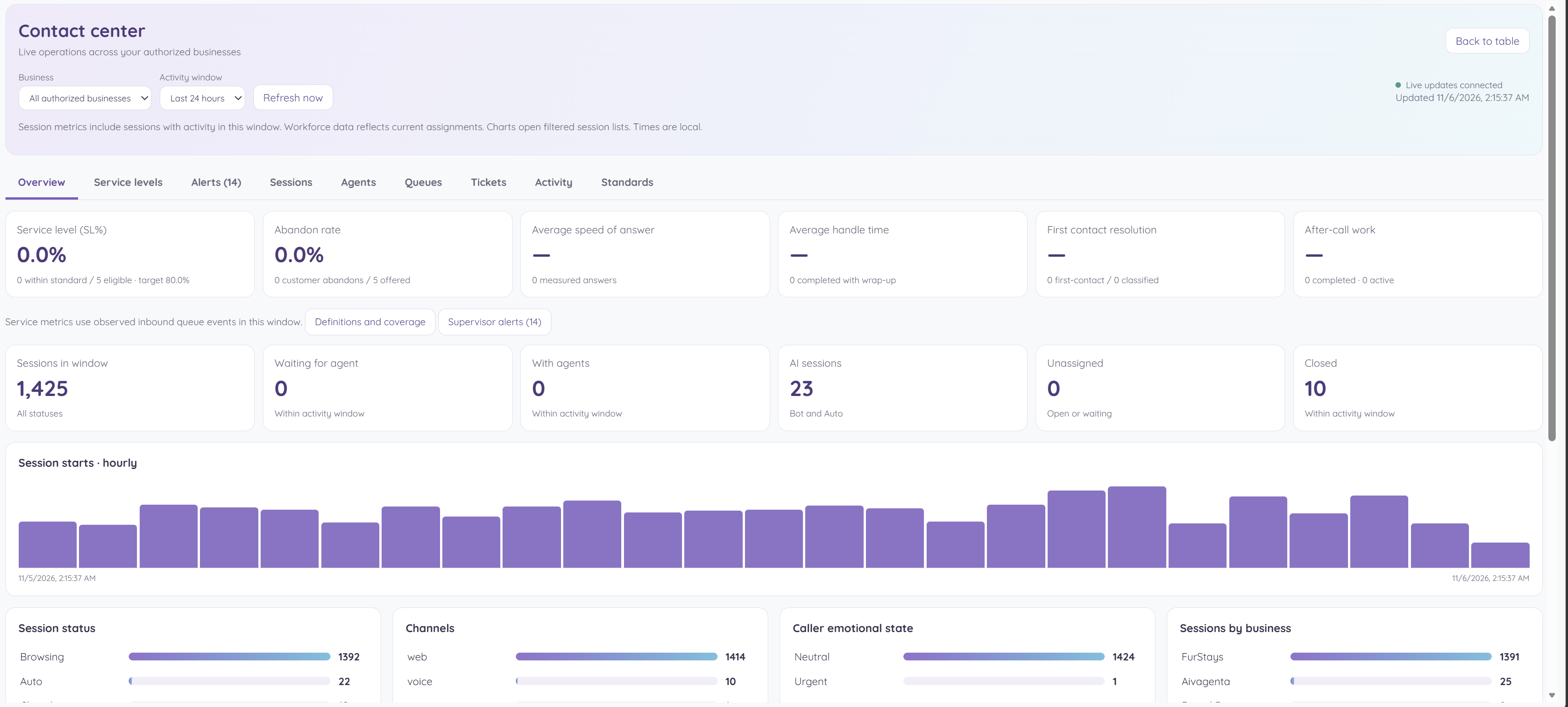
A manager checks service levels, waiting interactions and channel demand before deciding where the team needs help.
 View full size
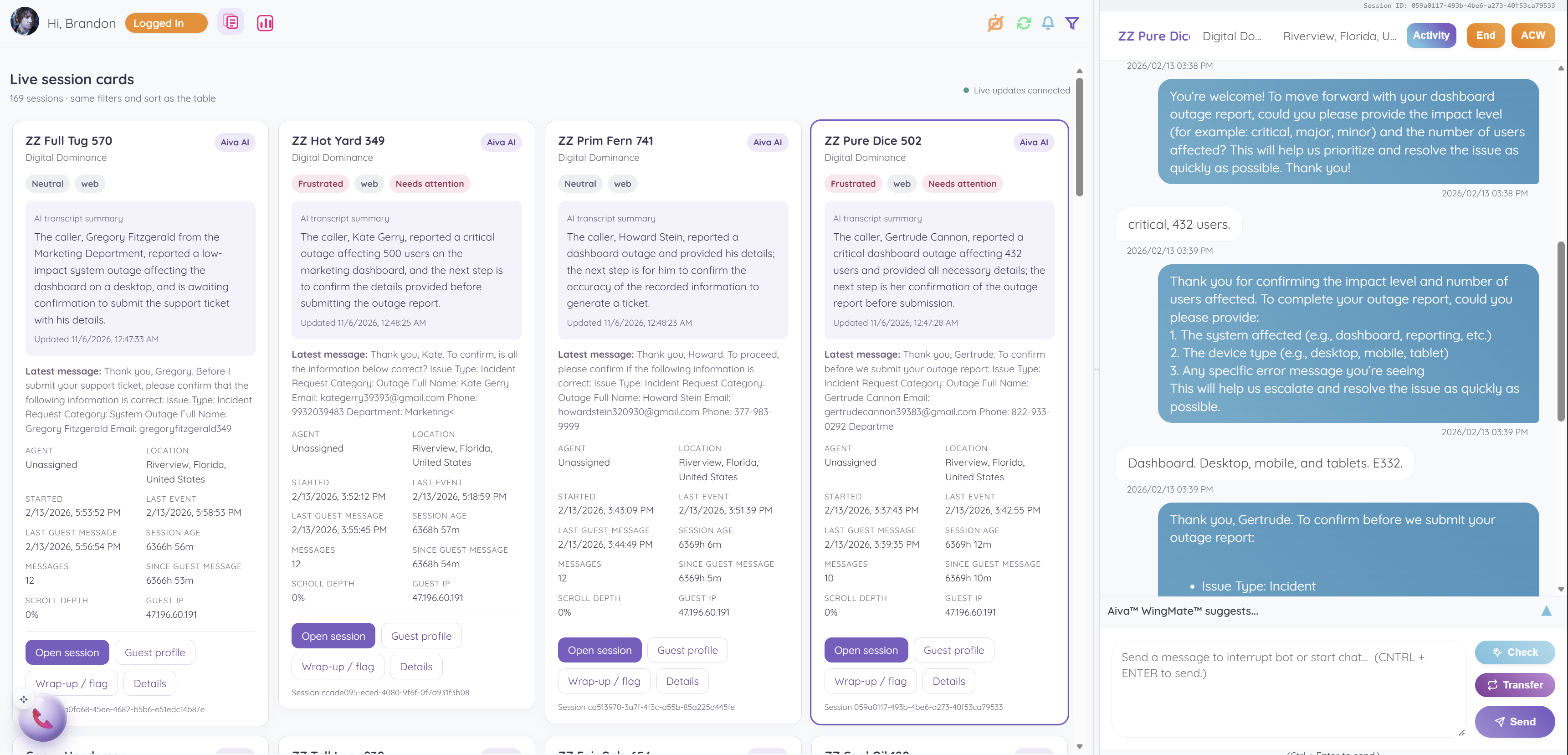
An agent reviews transcript briefs and attention flags, then opens the selected conversation with its context in view.
Select a column heading to sort. Select it again to reverse the order.
Find the tools that fit your work. Explore each feature, what it does and why it matters to your customers and team. Access and optional subscriptions are configured for your account.
| Conversations | NaviCom Live™ |
| Keep customer conversations together so your team can pick up the next interaction with context. |
| AI concierge | Aiva EngaigeMate™ CommsBot™ · Advanced AI™ |
| Handle repeat questions and prepare a useful handoff while your team focuses on work that needs a person. |
| Conversations | NaviCom Live™ · calling |
| Answer from the workspace and move callers to the right person with their conversation close at hand. |
| Visibility | NaviCom Live™ · session cards |
| Spot a conversation that needs attention without opening every session. |
| Contact center | NaviCom™ · operations |
| See where demand is building and direct attention to the team or queue that needs support. |
| Contact center | NaviCom™ · service metrics |
| Track response and resolution patterns so you can improve staffing, routing and follow-through. |
| Contact center | NaviCom™ · supervisor tools |
| Bring sensitive requests to an owner and preserve the details the next teammate needs. |
| Contact center | NaviCom™ · routing |
| Guide incoming requests to an available teammate with relevant skills. |
| Service management | WaiPoint ServiceDeck™ |
| Give each important request an owner, a next action and a visible path to resolution. |
| Conversations | NaviCom Mail™ |
| Turn an email conversation into tracked work with the customer history attached. |
| Automation | FliPath™ |
| Start from your business information and shape a connected workflow without building every step from scratch. |
| AI concierge | The LightHouse™ |
| Give Aiva™ and your team a shared source of business knowledge for more consistent answers. |
| Sales and customer context | SkyBase CRM™ |
| Carry the customer relationship from the first inquiry to the next deal or follow-up. |
| Agent assistance | Aiva WingMate™ · ChatAce™ |
| Help agents prepare their next reply while keeping a person in control. |
| Agent assistance | Aiva WingMate™ · MailAce™ |
| Reduce time spent assembling email context and preparing a first draft. |
| Agent assistance | Aiva WingMate™ · SalesAce™ / DealMaker™ |
| Prepare a more informed follow-up with the opportunity and customer history in view. |
| Agent assistance | Aiva WingMate™ · ServiceAce™ |
| Help agents respond with context, improve during the conversation and keep the next action moving. |
| Website engagement | SiteScout Raîdar™ |
| Spot buying interest, prioritize sales prospects and start outreach with useful page context. |
| Website engagement | Proactive Messaging™ + Promo Pops™ |
| Invite interested visitors into a conversation and draw attention to a relevant offer. |
| Visibility | OmniLogs™ / DeepSky Analytics™ |
| Find recurring service issues and use recorded activity to guide improvements. |
| Growth tools | CloudScout™ · LeadsLock Targetr™ |
| Build a more useful prospect list and bring research into the customer record. |
| Growth tools | CloudScout™ · SocialStream™ |
| Find relevant conversations and prepare a useful response with business context. |
| Automation | FliPath™ · API connections |
| Move customer information into connected systems and reduce repeat data entry. |
| Administration | FleetOps Admin™ |
| Keep teams, customer work and access organized as your operation grows. |
| Channels | AI Concierge Line™ |
| Give customers a regular phone number that connects to your AI front desk and team. |
| Mobile | Aivagenta™ · mobile appsDownload direct ↗ |
| Stay close to customer activity when your work takes you away from the desk. |
Bring data protection into your customer workflow. Visitor consent choices, transparent information and appropriate processing arrangements all play a part in GDPR compliance.
When enabled, the widget’s GDPR mode asks visitors for consent before gated chat features run. The widget uses browser storage for consent and session identifiers.
Access, correction, deletion and other GDPR rights apply where their legal conditions are met. Our privacy contact can help with requests relating to data handled by Aivagenta™.
Review our DPA for processing instructions, security, subprocessors and data handling. Complete the agreed processing details and schedules before execution.
Your configuration and operating practices remain part of your compliance responsibilities.
Give them a useful first answer. Give yourself a clearer next step.